

spring data core annotations
- Published on
- /15 mins read/
# giới thiệu
Nếu bạn từng viết DAO layer với hàng trăm dòng boilerplate — open connection, prepare statement, map ResultSet, handle exceptions, close resources — bạn sẽ hiểu tại sao Spring Data tồn tại.
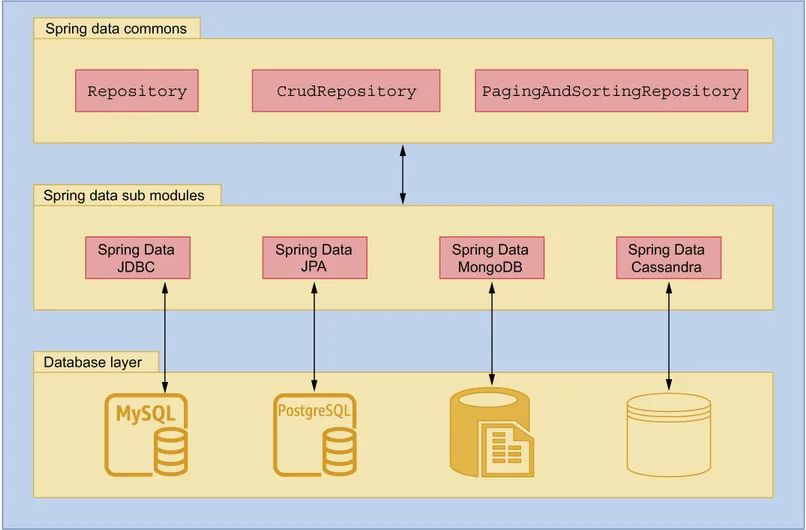
org.springframework.data là abstraction layer thống nhất cho mọi data store: JPA (PostgreSQL), MongoDB, Redis, Elasticsearch... Bạn khai báo interface, Spring generate implementation. Cùng một style findByStatusAndCreatedAtAfter() hoạt động cho cả SQL lẫn NoSQL.
Trong CSP, services dùng mix: PostgreSQL cho relational data (permissions, process apps), MongoDB cho document data (process definitions, build records, service discovery), Redis cho caching và distributed locks. Spring Data cho phép dùng cùng paradigm cho tất cả.
Note: JPA-specific annotations đã có trong file
spring-data-jpa-guide.md. File này cover annotations chung và MongoDB/Redis.
# repository annotations
Spring Data's magic nằm ở Repository pattern: bạn khai báo interface với method signatures có ý nghĩa → Spring parse tên method → generate query implementation tại runtime. Không viết 1 dòng SQL.
# @Repository — đánh dấu data access layer
@Repository  // Exception translation + component scan
public interface ProductRepository extends JpaRepository<Product, UUID> {}

// Spring Data auto-generates implementation cho interface
// @Repository thật ra KHÔNG cần vì Spring Data đã tự detect, nhưng convention tốt
# @NoRepositoryBean — base repository (không tạo implementation)
@NoRepositoryBean  // Spring KHÔNG tạo bean cho interface này
public interface BaseRepository<T, ID> extends JpaRepository<T, ID> {

   @Query("SELECT e FROM #{#entityName} e WHERE e.deletedAt IS NULL")
   List<T> findAllActive();

   @Modifying
   @Query("UPDATE #{#entityName} e SET e.deletedAt = CURRENT_TIMESTAMP WHERE e.id = :id")
   int softDelete(@Param("id") ID id);
}

// Concrete repositories extend base → Spring tạo implementation
@Repository
public interface ProductRepository extends BaseRepository<Product, UUID> {
   List<Product> findByStatus(ProductStatus status);
}

@Repository
public interface OrderRepository extends BaseRepository<Order, UUID> {
   List<Order> findByCustomerId(UUID customerId);
}
# @RepositoryDefinition — lightweight alternative
// Thay vì extend JpaRepository (có 20+ methods), chỉ expose methods cần thiết
@RepositoryDefinition(domainClass = Product.class, idClass = UUID.class)
public interface ReadOnlyProductRepository {
   Optional<Product> findById(UUID id);
   List<Product> findByStatus(ProductStatus status);
   long count();
   boolean existsById(UUID id);
   // Không có save, delete → read-only
}
# auditing annotations
Mỗi record trong database cần trả lời được: ai tạo, khi nào tạo, ai sửa lần cuối, khi nào sửa. Đây là audit trail — bắt buộc trong enterprise apps, đặc biệt ngành tài chính.
Thay vì set createdAt = LocalDateTime.now() thủ công trong mỗi service method, Spring Data Auditing tự động fill các fields đánh @CreatedDate, @LastModifiedDate, @CreatedBy, @LastModifiedBy. Bạn chỉ cần khai báo 1 lần trong base entity — mọi entity kế thừa đều có auditing miễn phí.
@CreatedBy/@LastModifiedBy lấy username từ AuditorAware bean — thường extract từ JWT token trong SecurityContext.
# @CreatedDate, @LastModifiedDate, @CreatedBy, @LastModifiedBy
@MappedSuperclass
@EntityListeners(AuditingEntityListener.class)
@Getter @Setter
public abstract class BaseEntity {

   @Id
   @GeneratedValue(strategy = GenerationType.UUID)
   private UUID id;

   @CreatedDate  // Auto set khi INSERT
   @Column(name = "created_at", nullable = false, updatable = false)
   private LocalDateTime createdAt;

   @LastModifiedDate  // Auto set khi INSERT + UPDATE
   @Column(name = "updated_at")
   private LocalDateTime updatedAt;

   @CreatedBy  // Auto set username/ID khi INSERT
   @Column(name = "created_by", updatable = false)
   private String createdBy;

   @LastModifiedBy  // Auto set khi INSERT + UPDATE
   @Column(name = "updated_by")
   private String updatedBy;
}

// Enable auditing
@Configuration
@EnableJpaAuditing(auditorAwareRef = "auditorProvider")
public class AuditConfig {

   @Bean
   public AuditorAware<String> auditorProvider() {
       return () -> Optional.ofNullable(SecurityContextHolder.getContext().getAuthentication())
           .filter(Authentication::isAuthenticated)
           .map(auth -> {
               if (auth.getPrincipal() instanceof Jwt jwt) {
                   return jwt.getClaimAsString("preferred_username");
               }
               return auth.getName();
           });
   }
}
# mongodb auditing
@Document(collection = "process_definitions")
@Getter @Setter
public class ProcessDefinition {

   @Id
   private String id;

   private String name;
   private String version;

   @CreatedDate
   private Instant createdAt;

   @LastModifiedDate
   private Instant updatedAt;

   @CreatedBy
   private String createdBy;

   @LastModifiedBy
   private String updatedBy;
}

// Enable
@Configuration
@EnableMongoAuditing
public class MongoAuditConfig {
   @Bean
   public AuditorAware<String> auditorProvider() { ... }
}
# query annotations
Derived queries (parse method name) cover 80% use cases. Nhưng khi query phức tạp — multiple JOINs, subqueries, native functions, aggregation — bạn cần @Query để viết query trực tiếp.
Điểm hay: @Query syntax khác nhau tùy module (JPQL cho JPA, JSON cho MongoDB) nhưng annotation giống nhau — consistent developer experience across data stores.
# @Query — custom queries (module-specific syntax)
// JPA (JPQL)
@Repository
public interface ProductJpaRepository extends JpaRepository<Product, UUID> {
   @Query("SELECT p FROM Product p WHERE p.status = :status AND p.deletedAt IS NULL")
   List<Product> findActiveByStatus(@Param("status") ProductStatus status);
}

// MongoDB
@Repository
public interface ProcessDefinitionRepository extends MongoRepository<ProcessDefinition, String> {
   @Query("{'workspaceId': ?0, 'status': ?1, 'deletedAt': null}")
   List<ProcessDefinition> findByWorkspaceAndStatus(String workspaceId, String status);

   @Query(value = "{'name': {$regex: ?0, $options: 'i'}}", sort = "{'createdAt': -1}")
   Page<ProcessDefinition> searchByName(String nameRegex, Pageable pageable);

   @Query(value = "{'tags': {$in: ?0}}", fields = "{'name': 1, 'version': 1, 'status': 1}")
   List<ProcessDefinition> findSummaryByTags(List<String> tags);
}
# @Param — named parameters
@Query("SELECT p FROM Product p WHERE p.name LIKE %:keyword% AND p.category.id = :catId")
Page<Product> search(@Param("keyword") String keyword, @Param("catId") UUID categoryId, Pageable pageable);
# @Modifying — write operations
@Modifying(clearAutomatically = true)
@Query("UPDATE Product p SET p.status = :status WHERE p.id IN :ids")
int bulkUpdateStatus(@Param("ids") Collection<UUID> ids, @Param("status") ProductStatus status);
# mongodb annotations (org.springframework.data.mongodb)
MongoDB là lựa chọn tự nhiên khi data có schema linh hoạt hoặc nested structures phức tạp. Trong CSP, MongoDB lưu process definitions (BPMN XML + metadata), build records, service discovery entries, form schemas — những thứ không fit well vào rigid relational schema.
Spring Data MongoDB cung cấp 2 cách làm việc:
- MongoRepository (declarative): Interface-based, giống JPA repository. Tốt cho CRUD đơn giản.
- MongoTemplate (imperative): Programmatic, full control. Tốt cho complex queries, aggregations, bulk operations.
Annotation @Document mapping class → collection (tương đương @Entity → table trong JPA). @Field custom tên field, @Indexed tạo index, @DBRef reference document khác.
# document mapping
@Document(collection = "build_records")  // Collection name
@TypeAlias("BuildRecord")               // Short class name trong _class field
@CompoundIndex(def = "{'workspaceId': 1, 'status': 1}", name = "idx_workspace_status")
@Getter @Setter @Builder
@NoArgsConstructor @AllArgsConstructor
public class BuildRecord {

   @Id  // Mapped to _id
   private String id;

   @Field("workspace_id")  // Custom field name in MongoDB
   @Indexed                // Single field index
   private String workspaceId;

   @Field("app_name")
   private String appName;

   @Field("version")
   private String version;

   @Indexed(unique = true)
   @Field("build_number")
   private String buildNumber;

   @Field("status")
   private BuildStatus status;

   @Field("artifacts")
   private List<Artifact> artifacts;

   @Field("metadata")
   private Map<String, Object> metadata;

   @DBRef  // Reference to another document (lazy loaded)
   private ProcessDefinition processDefinition;

   @DBRef(lazy = true)
   private User triggeredBy;

   // Embedded subdocument (không cần @DBRef)
   private BuildConfig config;

   @CreatedDate
   private Instant createdAt;

   @LastModifiedDate
   private Instant updatedAt;

   @Version  // Optimistic locking
   private Long version;

   @Transient  // NOT persisted to MongoDB
   private transient String computedField;
}

@Getter @Setter
public class Artifact {
   private String name;
   private String path;
   private long size;
   private String checksum;
}

@Getter @Setter
public class BuildConfig {
   private String baseImage;
   private Map<String, String> envVars;
   private List<String> buildArgs;
}
# mongodb repository
@Repository
public interface BuildRecordRepository extends MongoRepository<BuildRecord, String> {

   // Derived queries (same syntax as JPA)
   List<BuildRecord> findByWorkspaceIdAndStatus(String workspaceId, BuildStatus status);
   Optional<BuildRecord> findByBuildNumber(String buildNumber);
   Page<BuildRecord> findByWorkspaceIdOrderByCreatedAtDesc(String workspaceId, Pageable pageable);
   long countByWorkspaceIdAndStatus(String workspaceId, BuildStatus status);
   boolean existsByBuildNumber(String buildNumber);

   // @Query with MongoDB JSON syntax
   @Query("{'workspaceId': ?0, 'status': {$in: ?1}, 'createdAt': {$gte: ?2}}")
   List<BuildRecord> findRecentByStatuses(String workspaceId, List<BuildStatus> statuses, Instant since);

   // Projection — chỉ lấy fields cần thiết
   @Query(value = "{'workspaceId': ?0}", fields = "{'appName': 1, 'buildNumber': 1, 'status': 1}")
   List<BuildRecord> findSummaryByWorkspace(String workspaceId);

   // Delete
   void deleteByWorkspaceIdAndStatusAndCreatedAtBefore(
       String workspaceId, BuildStatus status, Instant before);

   // Aggregation
   @Aggregation(pipeline = {
       "{'$match': {'workspaceId': ?0}}",
       "{'$group': {'_id': '$status', 'count': {'$sum': 1}}}",
       "{'$sort': {'count': -1}}"
   })
   List<StatusCount> countByStatusGrouped(String workspaceId);
}

@Data
public class StatusCount {
   @Field("_id")
   private String status;
   private long count;
}
# MongoTemplate — complex operations
@Service
@RequiredArgsConstructor
public class BuildRecordService {

   private final MongoTemplate mongoTemplate;

   // Complex query
   public List<BuildRecord> search(BuildSearchCriteria criteria) {
       Query query = new Query();

       if (criteria.getWorkspaceId() != null) {
           query.addCriteria(Criteria.where("workspaceId").is(criteria.getWorkspaceId()));
       }
       if (criteria.getKeyword() != null) {
           query.addCriteria(Criteria.where("appName")
               .regex(criteria.getKeyword(), "i"));
       }
       if (criteria.getStatuses() != null) {
           query.addCriteria(Criteria.where("status").in(criteria.getStatuses()));
       }
       if (criteria.getFromDate() != null) {
           query.addCriteria(Criteria.where("createdAt").gte(criteria.getFromDate()));
       }

       query.with(Sort.by(Sort.Direction.DESC, "createdAt"));
       query.with(PageRequest.of(criteria.getPage(), criteria.getSize()));

       return mongoTemplate.find(query, BuildRecord.class);
   }

   // Update specific fields
   public void updateStatus(String id, BuildStatus status) {
       Query query = Query.query(Criteria.where("id").is(id));
       Update update = new Update()
           .set("status", status)
           .set("updatedAt", Instant.now())
           .push("metadata.statusHistory", Map.of("status", status, "at", Instant.now()));

       mongoTemplate.updateFirst(query, update, BuildRecord.class);
   }

   // Upsert
   public void upsertDiscovery(String serviceId, ServiceInfo info) {
       Query query = Query.query(Criteria.where("serviceId").is(serviceId));
       Update update = new Update()
           .set("host", info.getHost())
           .set("port", info.getPort())
           .set("lastHeartbeat", Instant.now())
           .setOnInsert("registeredAt", Instant.now());

       mongoTemplate.upsert(query, update, "service_discovery");
   }

   // Aggregation
   public List<BuildStats> getBuildStats(String workspaceId, Instant from) {
       Aggregation agg = Aggregation.newAggregation(
           Aggregation.match(Criteria.where("workspaceId").is(workspaceId)
               .and("createdAt").gte(from)),
           Aggregation.group("status")
               .count().as("count")
               .avg("metadata.durationMs").as("avgDuration"),
           Aggregation.sort(Sort.Direction.DESC, "count")
       );

       return mongoTemplate.aggregate(agg, "build_records", BuildStats.class)
           .getMappedResults();
   }
}
# redis annotations (org.springframework.data.redis)
Redis trong CSP đóng 3 vai trò: caching (giảm DB load), session storage (stateless services share session), và distributed locks (Shedlock cho scheduled tasks không chạy duplicate across instances).
Spring Data Redis hỗ trợ 2 mô hình:
- @RedisHash: Lưu object như Redis Hash — có repository pattern, query by indexed fields. Dùng cho entities cần CRUD (sessions, temp data).
- @Cacheable/@CacheEvict: Cache method results — transparent caching layer. Dùng cho read-heavy data ít thay đổi (product catalog, config).
@TimeToLive đặc biệt hữu ích — mỗi entry tự expire, không cần cleanup job. Perfect cho sessions, OTP codes, rate limiting counters.
# @RedisHash — redis entity
@RedisHash(value = "sessions", timeToLive = 3600)  // TTL = 1 hour
@Getter @Setter @Builder
public class UserSession {

   @Id
   private String id;

   @Indexed  // Searchable by this field
   private String userId;

   @Indexed
   private String workspaceId;

   private String username;
   private Set<String> roles;
   private Map<String, String> metadata;
   private Instant createdAt;
   private Instant lastAccessedAt;

   @TimeToLive  // Dynamic TTL per instance
   private Long ttl;
}

@Repository
public interface UserSessionRepository extends CrudRepository<UserSession, String> {
   List<UserSession> findByUserId(String userId);
   List<UserSession> findByWorkspaceId(String workspaceId);
   void deleteByUserId(String userId);
}
# spring cache with redis
@Configuration
@EnableCaching
public class CacheConfig {

   @Bean
   public RedisCacheManager cacheManager(RedisConnectionFactory factory) {
       RedisCacheConfiguration defaultConfig = RedisCacheConfiguration.defaultCacheConfig()
           .entryTtl(Duration.ofMinutes(30))
           .serializeKeysWith(RedisSerializationContext.SerializationPair
               .fromSerializer(new StringRedisSerializer()))
           .serializeValuesWith(RedisSerializationContext.SerializationPair
               .fromSerializer(new GenericJackson2JsonRedisSerializer()))
           .disableCachingNullValues();

       Map<String, RedisCacheConfiguration> cacheConfigs = Map.of(
           "products", defaultConfig.entryTtl(Duration.ofHours(1)),
           "users", defaultConfig.entryTtl(Duration.ofMinutes(15)),
           "configs", defaultConfig.entryTtl(Duration.ofHours(24))
       );

       return RedisCacheManager.builder(factory)
           .cacheDefaults(defaultConfig)
           .withInitialCacheConfigurations(cacheConfigs)
           .build();
   }
}

@Service
@RequiredArgsConstructor
public class ProductService {

   private final ProductRepository productRepository;

   @Cacheable(value = "products", key = "#id", unless = "#result == null")
   public ProductDTO getById(UUID id) {
       return productRepository.findById(id)
           .map(this::toDTO)
           .orElseThrow(() -> new EntityNotFoundException("Product not found: " + id));
   }

   @Cacheable(value = "products", key = "'list:' + #status + ':' + #pageable.pageNumber")
   public Page<ProductDTO> findByStatus(ProductStatus status, Pageable pageable) {
       return productRepository.findByStatus(status, pageable).map(this::toDTO);
   }

   @CachePut(value = "products", key = "#result.id")
   public ProductDTO update(UUID id, UpdateProductRequest request) {
       Product product = productRepository.findById(id).orElseThrow();
       product.setName(request.getName());
       return toDTO(productRepository.save(product));
   }

   @CacheEvict(value = "products", key = "#id")
   public void delete(UUID id) {
       productRepository.deleteById(id);
   }

   @CacheEvict(value = "products", allEntries = true)
   public void clearCache() {
       // Xóa tất cả entries trong cache "products"
   }

   // Multiple cache operations
   @Caching(evict = {
       @CacheEvict(value = "products", key = "#id"),
       @CacheEvict(value = "products", key = "'list:*'", allEntries = true)
   })
   public void deleteAndInvalidateList(UUID id) {
       productRepository.deleteById(id);
   }
}
# pagination & sorting (cross-module)
Mọi API list/search đều cần phân trang — không ai muốn trả 100K records trong 1 response. Spring Data cung cấp Pageable (request) và Page/Slice (response) dùng chung cho JPA, MongoDB, Elasticsearch.
Page vs Slice là trade-off kinh điển: Page biết tổng records (cần thêm COUNT query — chậm trên bảng lớn), Slice chỉ biết "có trang tiếp không" (nhanh hơn, phù hợp infinite scroll). Chọn tùy UI: pagination buttons cần Page, "Load more" button cần Slice.
# pageable, page, slice, sort
// Pageable — request object
Pageable pageable = PageRequest.of(0, 20);                          // page 0, size 20
Pageable pageable = PageRequest.of(0, 20, Sort.by("name"));         // + sort
Pageable pageable = PageRequest.of(0, 20, Sort.by(Direction.DESC, "createdAt"));

// Sort
Sort sort = Sort.by("name");                                         // ASC
Sort sort = Sort.by(Direction.DESC, "createdAt");                    // DESC
Sort sort = Sort.by("status").ascending().and(Sort.by("name").descending());  // Multi

// Page — kết quả phân trang (biết total)
Page<Product> page = repository.findByStatus(status, pageable);
page.getContent();        // List<Product> — data
page.getTotalElements();  // long — total records
page.getTotalPages();     // int — total pages
page.getNumber();         // int — current page (0-based)
page.getSize();           // int — page size
page.hasNext();           // boolean
page.hasPrevious();       // boolean
page.isFirst();           // boolean
page.isLast();            // boolean

// Slice — kết quả phân trang (KHÔNG biết total — faster)
Slice<Product> slice = repository.findByCategory(cat, pageable);
slice.getContent();       // List<Product>
slice.hasNext();          // boolean (fetches N+1 records to check)
// KHÔNG có getTotalElements(), getTotalPages()

// Page transformation
Page<ProductDTO> dtoPage = page.map(product -> toDTO(product));
# domain events (cross-module)
Domain-Driven Design (DDD) nói rằng: khi aggregate thay đổi state quan trọng, nó nên phát ra event. Spring Data tích hợp pattern này qua AbstractAggregateRoot — entity tự register events, Spring tự publish sau repository.save().
Đây là cầu nối giữa persistence layer và event-driven architecture. Order entity gọi confirm() → register OrderConfirmedEvent → repository.save() → Spring publish event → listeners react (send notification, update inventory, log analytics). Tất cả tự động, declarative, và transactionally safe.
// AbstractAggregateRoot — tích hợp Domain Events
@Entity
public class Order extends AbstractAggregateRoot<Order> {

   @Id
   private UUID id;
   private OrderStatus status;

   public Order confirm() {
       this.status = OrderStatus.CONFIRMED;
       registerEvent(new OrderConfirmedEvent(this.id));  // Queue event
       return this;
   }

   public Order cancel(String reason) {
       this.status = OrderStatus.CANCELLED;
       registerEvent(new OrderCancelledEvent(this.id, reason));
       return this;
   }
}

// Events published AFTER repository.save() successfully
@Service
@RequiredArgsConstructor
public class OrderService {
   private final OrderRepository repo;

   @Transactional
   public OrderDTO confirm(UUID id) {
       Order order = repo.findById(id).orElseThrow();
       order.confirm();
       repo.save(order);  // → triggers OrderConfirmedEvent AFTER TX commits
       return toDTO(order);
   }
}

// Listener
@Component
public class OrderEventHandler {
   @TransactionalEventListener(phase = TransactionPhase.AFTER_COMMIT)
   public void onOrderConfirmed(OrderConfirmedEvent event) {
       notificationService.notifyCustomer(event.getOrderId());
   }
}
# @Transient & @ReadOnlyProperty
Không phải mọi field trong Java object đều cần persist. Computed fields (discounted price = price × 0.9), cached values, temporary state — dùng @Transient để Spring Data bỏ qua khi read/write database.
@ReadOnlyProperty (Spring Data 3.0+) cho fields chỉ đọc từ DB nhưng không ghi — ví dụ: computed columns, database triggers tự generate, hoặc fields managed bởi DB functions.
@Entity
public class Product extends BaseEntity {

   private String name;
   private BigDecimal price;

   @Transient  // KHÔNG lưu vào database
   private BigDecimal discountedPrice;

   @ReadOnlyProperty  // Chỉ đọc từ DB, không ghi (computed column, DB trigger)
   @Column(name = "search_vector", insertable = false, updatable = false)
   private String searchVector;

   @PostLoad
   public void computeFields() {
       this.discountedPrice = this.price.multiply(BigDecimal.valueOf(0.9));
   }
}
# spring data rest (auto-expose repositories as rest apis)
Đây là feature "wow" cho rapid prototyping: Spring tự động tạo đầy đủ REST CRUD endpoints từ repository interface. Không viết controller, không viết service — declare entity + repository → có API.
Trong production, bạn thường không dùng Spring Data REST trực tiếp (thiếu business logic, validation, security granularity). Nhưng nó tuyệt vời cho admin APIs, internal tooling, hoặc giai đoạn prototype khi cần API nhanh để frontend bắt đầu develop.
// Tự động tạo REST endpoints từ repository
@RepositoryRestResource(path = "products", collectionResourceRel = "products")
public interface ProductRepository extends JpaRepository<Product, UUID> {

   @RestResource(path = "by-status", rel = "by-status")
   List<Product> findByStatus(@Param("status") ProductStatus status);

   @RestResource(exported = false)  // KHÔNG expose endpoint này
   void deleteById(UUID id);
}

// Auto-generated endpoints:
// GET    /products              → findAll (paginated)
// GET    /products/{id}         → findById
// POST   /products              → save
// PUT    /products/{id}         → save (update)
// PATCH  /products/{id}         → partial update
// DELETE /products/{id}         → delete
// GET    /products/search/by-status?status=ACTIVE → custom finder

// Configuration
@Configuration
public class RestConfig implements RepositoryRestConfigurer {
   @Override
   public void configureRepositoryRestConfiguration(RepositoryRestConfiguration config,
           CorsRegistry cors) {
       config.exposeIdsFor(Product.class, Order.class);  // Include ID in response
       config.setBasePath("/api");  // Base path
   }
}
# quick reference — all spring data annotations
| Annotation | Module | Mục đích |
|---|---|---|
| @Repository | Core | Data access bean marker |
| @NoRepositoryBean | Core | Base repository (no impl) |
| @Query | Core | Custom query definition |
| @Param | Core | Named parameter |
| @Modifying | Core | Write operation query |
| @CreatedDate | Core | Auto audit creation time |
| @LastModifiedDate | Core | Auto audit update time |
| @CreatedBy | Core | Auto audit creator |
| @LastModifiedBy | Core | Auto audit updater |
| @Version | Core | Optimistic locking |
| @Transient | Core | Not persisted |
| @ReadOnlyProperty | Core | Read-only field |
| @Id | Core | Primary key / Document ID |
| @Document | MongoDB | MongoDB document mapping |
| @Field | MongoDB | Custom field name |
| @Indexed | MongoDB/Redis | Index on field |
| @CompoundIndex | MongoDB | Compound index |
| @DBRef | MongoDB | Document reference |
| @Aggregation | MongoDB | Aggregation pipeline query |
| @TextIndexed | MongoDB | Full-text search index |
| @RedisHash | Redis | Redis hash entity |
| @TimeToLive | Redis | TTL for Redis entry |
| @Cacheable | Cache | Cache method result |
| @CachePut | Cache | Update cache |
| @CacheEvict | Cache | Remove from cache |
| @EnableCaching | Cache | Enable cache support |
| @EnableJpaAuditing | JPA | Enable JPA auditing |
| @EnableMongoAuditing | MongoDB | Enable MongoDB auditing |
| @RepositoryRestResource | REST | REST exposure config |
Chỉ là những ghi chép cá nhân với hy vọng mang lại chút giá trị. Nếu thấy hữu ích, đừng ngại chia sẻ cho bạn bè & đồng nghiệp nhé!
Happy coding 😎 👍🏻 🚀 🔥.
On this page
- # giới thiệu
- # repository annotations
- # @Repository — đánh dấu data access layer
- # @NoRepositoryBean — base repository (không tạo implementation)
- # @RepositoryDefinition — lightweight alternative
- # auditing annotations
- # @CreatedDate, @LastModifiedDate, @CreatedBy, @LastModifiedBy
- # mongodb auditing
- # query annotations
- # @Query — custom queries (module-specific syntax)
- # @Param — named parameters
- # @Modifying — write operations
- # mongodb annotations (org.springframework.data.mongodb)
- # document mapping
- # mongodb repository
- # MongoTemplate — complex operations
- # redis annotations (org.springframework.data.redis)
- # @RedisHash — redis entity
- # spring cache with redis
- # pagination & sorting (cross-module)
- # pageable, page, slice, sort
- # domain events (cross-module)
- # @Transient & @ReadOnlyProperty
- # spring data rest (auto-expose repositories as rest apis)
- # quick reference — all spring data annotations