

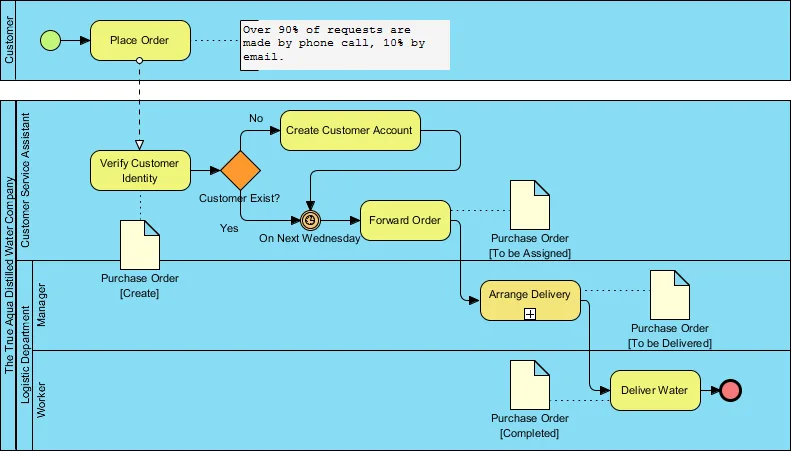
# giới thiệu
BPMN 2.0 (Business Process Model and Notation) là một tiêu chuẩn quốc tế được bảo chứng bởi OMG (Object Management Group) - từ lâu đã vượt xa khái niệm của một công cụ vẽ flowchart thông thường. Nó cung cấp một hệ thống ký hiệu đồ họa trực quan, đóng vai trò như một "Ubiquitous Language" (Ngôn ngữ chung) cho cả Business Analyst (BA) lẫn Developer. BPMN chính là cầu nối triệt tiêu khoảng cách giữa "Nghiệp vụ muốn gì"* (Business Intent) và "Hệ thống thực thi thế nào" (System Execution).
Trong các hệ thống Enterprise quy mô lớn như Ngân hàng, Bảo hiểm hay Logistics, BPMN đóng vai trò là công nghệ lõi (core technology). Nó cung cấp một nền tảng (platform) cho phép thiết kế và điều phối (orchestrate) các workflow phức tạp thông qua những Workflow Engine mạnh mẽ như Camunda, Flowable hay Activiti.
Mọi quy trình đều tuân thủ một lifecycle nghiêm ngặt: Design → Deploy → Execute → Monitor. Điểm mấu chốt của kiến trúc này là: mọi hình vẽ đồ họa trên UI đều được "backing" bởi định dạng BPMN 2.0 XML chuẩn hóa, sẵn sàng để engine biên dịch và thực thi trực tiếp.
Tại sao một Senior/Principal Backend Engineer bắt buộc phải làm chủ BPMN?
Khi làm việc với các hệ thống enterprise, Developer không chỉ viết CRUD. Việc thấu hiểu BPMN là chìa khóa để:
Audit & alignment: Đọc hiểu và review chéo (cross-review) các
process definitionsdo BA thiết kế, đảm bảo tính khả thi về mặt kỹ thuật.Core implementation: Trực tiếp implement các
system tasks,event listenersvàJava delegatesđể gắn logic code vào các node của quy trình.Troubleshooting: Debug sâu vào các luồng
process executionkhi có sự cố tắc nghẽn state (state machine issues).Performance tuning: Tối ưu hóa hiệu năng thực thi của các luồng quy trình lớn, xử lý bài toán
concurrencyvàdatabase lockingcủa engine.System integration: Thiết kế kiến trúc tích hợp (integration) giữa
BPMN Enginevà hệ sinh thái Microservices - đặc biệt là áp dụng luồng BPMN để giải quyết bài toánDistributed Transactions(VD: Orchestration Saga Pattern).
# kiến trúc bpmn 2.0
Hãy hình dung bạn đang thiết kế luồng xử lý cho một hệ thống Loan Origination (Khởi tạo khoản vay). Bạn sẽ cần xác định rõ: điểm kích hoạt (khách hàng submit hồ sơ), các node xử lý nghiệp vụ (thẩm định rủi ro, phê duyệt tín dụng), các Gateway rẽ nhánh logic (chấp thuận hay từ chối?) và điểm kết thúc (giải ngân hoặc gửi thông báo). BPMN 2.0 chuẩn hóa toàn bộ các khái niệm này thành một bộ ký hiệu duy nhất. Sự chuẩn hóa này đảm bảo tính vendor-agnostic - bất kể bạn dùng tool nào để vẽ, mọi developer và BA nhìn vào đều hiểu chung một ngữ nghĩa duy nhất.
Nhưng điểm "ăn tiền" nhất mà rất nhiều developer thường đánh giá thấp: BPMN 2.0 không phải là một bức tranh vô tri.
Dưới lăng kính hệ thống, nó là một Executable Specification (Đặc tả có khả năng thực thi). Cấu trúc file BPMN XML đóng vai trò như một Single Source of Truth (Nguồn sự thật duy nhất): nó vừa render ra hình ảnh trực quan trên màn hình, vừa đóng vai trò là tập lệnh để các engine như Camunda, Activiti hay Flowable biên dịch (parse) và quản lý trạng thái (state) trực tiếp trên server. Diagram đẹp mắt trên UI và logic đang chạy ngầm dưới backend thực chất là CÙNG MỘT FILE.
Để cấu trúc nên khả năng thực thi mạnh mẽ này, BPMN 2.0 được chia thành 5 nhóm elements cốt lõi.
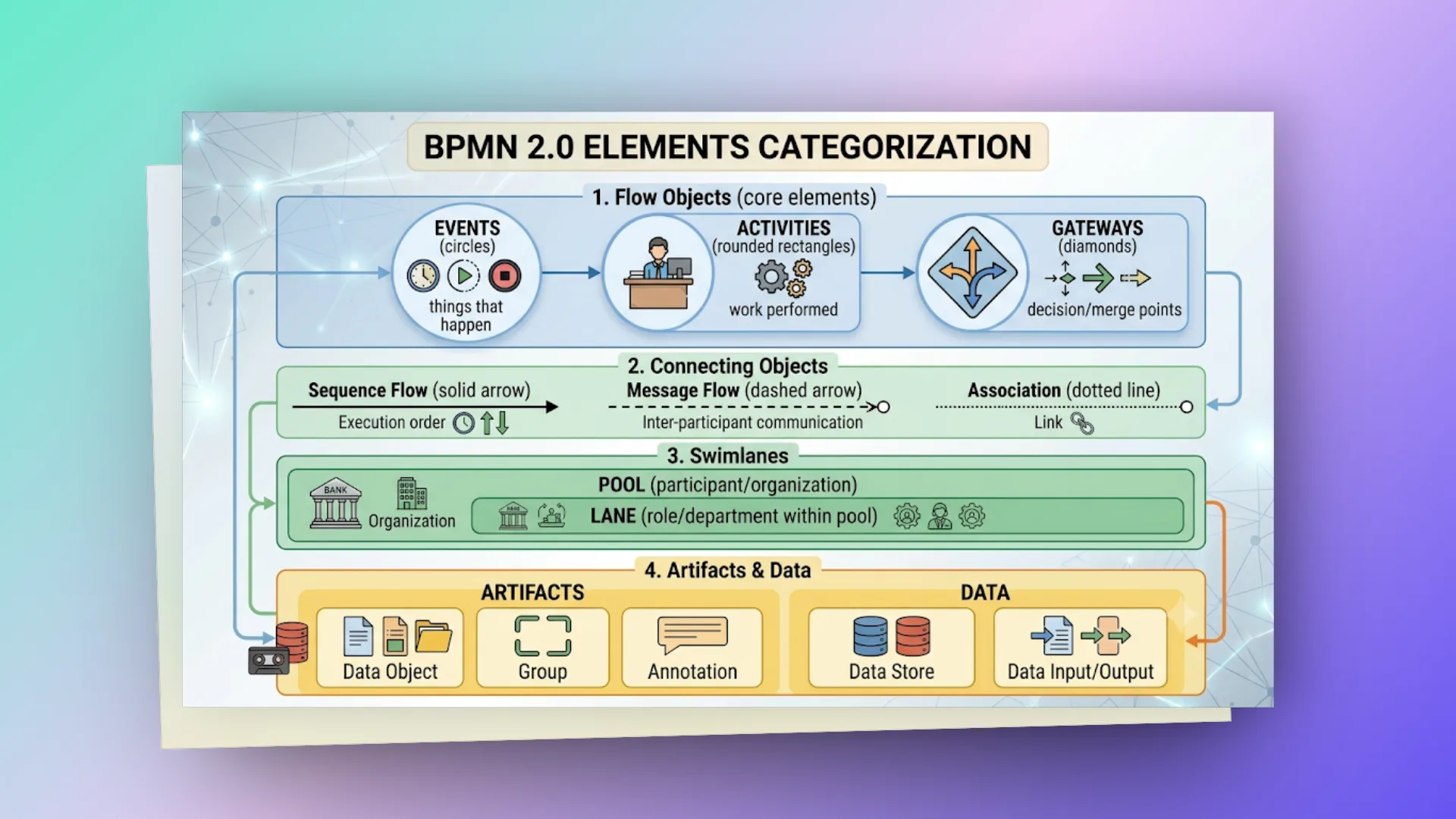
Bạn không cần thuộc lòng tất cả - 80% các quy trình phức tạp nhất cũng chỉ xoay quanh khoảng 10-15 core elements được sử dụng lặp đi lặp lại. Phần tiếp theo đi sâu vào từng nhóm với ví dụ thực tế.
# events - "điều gì xảy ra"
Events là những sự kiện xảy ra trong vòng đời process. Chúng được biểu diễn bằng hình tròn - và chính viền của hình tròn cho bạn biết loại event:
- Viền mảnh (thin) = Start Event
- Viền đôi (double) = Intermediate Event
- Viền dày (bold) = End Event
Bên trong hình tròn, icon cho biết trigger type: đồng hồ (timer), phong bì (message), sấm sét (signal), lửa (error)...
Một điểm quan trọng mà nhiều người bỏ qua: events được chia làm hai cơ chế hoạt động hoàn toàn trái ngược Catching (chờ sự kiện đến) và Throwing (phát ra sự kiện).
- Catching (Lắng nghe/Chờ đợi): Process đang trong trạng thái "blocking" hoặc "waiting" để đợi một tín hiệu từ bên ngoài (tương tự như đóng vai trò Consumer lắng nghe một topic).
- Throwing (Phát ngẫu): Process chủ động "bắn" ra một tín hiệu để thông báo cho hệ sinh thái xung quanh (đóng vai trò Producer).
Việc phân định rạch ròi hai cơ chế này là cực kỳ quan trọng khi bạn thiết kế luồng giao tiếp giữa các hệ thống (Inter-process Communication).
Trong thực tế, chúng ta sẽ gặp nhiều nhất:
- Timer events: Xử lý bài toán SLA và Timeout. Ví dụ: Task duyệt hồ sơ nếu treo quá 48h sẽ tự động trigger luồng escalation báo cáo lên cấp quản lý.
- Message events: Trái tim của kiến trúc tích hợp. Dùng để hứng
Webhooktừ hệ thống external hoặc nhận các tín hiệu giao tiếp liên dịch vụ (inter-service triggers) thông qua các message brokers như Kafka hay RabbitMQ. - Error events: Cơ chế xử lý lỗi tinh tế. Ví dụ: Khi call API thanh toán thất bại, hệ thống trigger Error Event để chạy luồng bù trừ - Compensating Transaction trong kiến trúc Saga, rollback lại trạng thái trước đó hoặc rẽ nhánh sang luồng xử lý thủ công.
# start events - khởi đầu process
| Event | Ký hiệu | Mô tả | Use case |
|---|---|---|---|
| None Start | (empty circle) | Manually triggered | User click "Start Process" |
| Timer Start | với clock | Triggered theo schedule | Daily report generation |
| Message Start | với envelope | Triggered bởi message | Order received from API |
| Signal Start | với triangle | Triggered bởi broadcast signal | System-wide event |
| Conditional Start | với paper | Triggered khi condition = true | KPI threshold exceeded |
<!-- None Start Event -->
<startEvent id="start" name="Start Process"/>

<!-- Timer Start Event: chạy mỗi ngày lúc 8:00 AM -->
<startEvent id="timerStart" name="Daily Trigger">
   <timerEventDefinition>
       <timeCycle>0 0 8 * * ?</timeCycle>
   </timerEventDefinition>
</startEvent>

<!-- Message Start Event -->
<startEvent id="msgStart" name="Order Received">
   <messageEventDefinition messageRef="orderMessage"/>
</startEvent>
# intermediate events - giữa process
Intermediate events xảy ra giữa start và end - chờ event, ném signal, delay process.
<!-- Timer Intermediate (wait/delay) -->
<intermediateCatchEvent id="wait3days" name="Wait 3 Days">
   <timerEventDefinition>
       <timeDuration>P3D</timeDuration>  <!-- ISO 8601: 3 days -->
   </timerEventDefinition>
</intermediateCatchEvent>

<!-- Message Intermediate Catch (wait for message) -->
<intermediateCatchEvent id="waitApproval" name="Wait for Approval">
   <messageEventDefinition messageRef="approvalMessage"/>
</intermediateCatchEvent>

<!-- Signal Throw (broadcast to all processes listening) -->
<intermediateThrowEvent id="notifyAll" name="Notify All">
   <signalEventDefinition signalRef="processCompleteSignal"/>
</intermediateThrowEvent>

<!-- Boundary Timer (attached to task — deadline/timeout) -->
<boundaryEvent id="deadline" attachedToRef="reviewTask" cancelActivity="true">
   <timerEventDefinition>
       <timeDuration>PT48H</timeDuration>  <!-- 48 hours timeout -->
   </timerEventDefinition>
</boundaryEvent>
<!-- Nếu reviewTask không xong trong 48h → cancel task, đi đường khác -->
# end events - kết thúc process
| Event | Mô tả | Effect |
|---|---|---|
| None End | Process instance kết thúc bình thường | Terminate path |
| Terminate End | Kết thúc TẤT CẢ paths (parallel) ngay lập tức | Kill toàn bộ instance |
| Error End | Throw error (catch bởi boundary error event) | Error propagation |
| Message End | Gửi message khi kết thúc | Notify external |
| Signal End | Broadcast signal khi kết thúc | Notify all listeners |
<!-- Normal End -->
<endEvent id="end" name="Process Complete"/>

<!-- Terminate End: kill tất cả parallel paths -->
<endEvent id="terminateEnd" name="Abort All">
   <terminateEventDefinition/>
</endEvent>

<!-- Error End: throw error lên parent process -->
<endEvent id="errorEnd" name="Payment Failed">
   <errorEventDefinition errorRef="paymentError"/>
</endEvent>
# activities - "công việc được thực hiện"
Nếu Events định nghĩa "điều gì vừa kích hoạt" và Gateways quyết định "hệ thống sẽ rẽ nhánh nào", thì Activities chính là nơi công việc thực sự được giải quyết. Dưới lăng kính của một kỹ sư Backend, đây là "vùng đất" chúng ta dành nhiều thời gian nhất, bởi mỗi Activity trên bản vẽ sẽ được map trực tiếp xuống các khối code xử lý logic.
Về mặt thị giác, Activities luôn là những khối hình chữ nhật bo góc. Hãy chú ý đến icon nhỏ ở góc trên bên trái, nó sẽ phân định chính xác bản chất của tác vụ: hình người (User Task), bánh răng (Service Task), hoặc cuộn giấy (Script Task).
Nhưng điểm mấu chốt kiến trúc thực sự nằm ở cách Engine xử lý trạng thái:
- User Task (wait state): Khi chạm đến node này,
BPMN Enginesẽ tạo ra một trạng thái chờ ("wait state"). Trạng thái của process được persist (lưu) an toàn xuống database và luồng thực thi tạm ngưng hoàn toàn, chờ đợi các tương táctừ con người (như fill form, click approve trên UI). - Service Task (integration point): Đây là điểm giao thoa giữa quy trình và hệ thống backend.
Service Tasklà nơi bạn "plug" (nhúng) mã nguồn Java vào. Nó có thể là mộttriggerđể gọi external REST API, xử lý tính toán phức tạp hoặc đẩy message vàoqueue/broker. Đây chính làIntegration Pointhoàn hảo giữa engine và các Spring Boot services.
Sức mạnh lớn nhất của thiết kế này là khả năng làm việc song song (Parallel Collaboration). Trong các enterprise workflow, BA cứ việc vẽ diagram để cấu trúc luồng nghiệp vụ; trong khi đó, Backend Developer độc lập implement các JavaDelegate map thẳng vào các Spring Beans. Không ai block ai. Đó chính là đỉnh cao của việc áp dụng "Clean Architecture" vào quy trình phối hợp làm việc.
# task types
| Task Type | Icon | Mô tả | Implementation |
|---|---|---|---|
| User Task | 👤 | Con người thực hiện (form, approval) | Assigned to user/group |
| Service Task | ⚙️ | Hệ thống tự động thực hiện | Java class, REST call |
| Script Task | 📜 | Execute script (Groovy, JS) | Inline code |
| Send Task | ✉️ | Gửi message | Message broker, email |
| Receive Task | 📨 | Chờ nhận message | Wait state |
| Business Rule Task | 📋 | Execute business rules | DMN decision table |
| Manual Task | ✋ | Task ngoài hệ thống (physical) | No system interaction |
| Call Activity | ↗️ | Gọi process khác (reusable) | Sub-process reference |
# user task - human interaction
<userTask id="approveRequest" name="Approve Loan Request"
         activiti:assignee="${applicant}"
         activiti:candidateGroups="loan-approvers">
   <documentation>Review loan application and approve/reject</documentation>

   <!-- Form properties (hiển thị form cho user) -->
   <extensionElements>
       <activiti:formProperty id="decision" name="Decision"
           type="enum" required="true">
           <activiti:value id="approve" name="Approve"/>
           <activiti:value id="reject" name="Reject"/>
       </activiti:formProperty>
       <activiti:formProperty id="comments" name="Comments"
           type="string" required="false"/>
   </extensionElements>
</userTask>
# service task - automated work
<!-- Java Delegate -->
<serviceTask id="calculateScore" name="Calculate Credit Score"
            activiti:class="com.example.bpm.delegate.CreditScoreDelegate"/>

<!-- Expression (call Spring bean method) -->
<serviceTask id="sendNotification" name="Send Email"
            activiti:expression="${notificationService.sendEmail(execution)}"/>

<!-- Delegate Expression (Spring bean) -->
<serviceTask id="processPayment" name="Process Payment"
            activiti:delegateExpression="${paymentDelegate}"/>

<!-- HTTP Task (REST call) -->
<serviceTask id="callExternalApi" name="Verify Identity"
            activiti:type="http">
   <extensionElements>
       <activiti:field name="requestMethod" stringValue="POST"/>
       <activiti:field name="requestUrl"
           stringValue="http://identity-service/api/v1/verify"/>
       <activiti:field name="requestBody"
           expression="${execution.getVariable('requestPayload')}"/>
   </extensionElements>
</serviceTask>
# java delegate implementation
@Component("creditScoreDelegate")
@RequiredArgsConstructor
@Slf4j
public class CreditScoreDelegate implements JavaDelegate {

   private final CreditScoringService scoringService;

   @Override
   public void execute(DelegateExecution execution) {
       String customerId = (String) execution.getVariable("customerId");
       BigDecimal loanAmount = (BigDecimal) execution.getVariable("loanAmount");

       log.info("Calculating credit score | customerId={} | loanAmount={}",
           customerId, loanAmount);

       CreditScore score = scoringService.calculate(customerId, loanAmount);

       // Set process variables cho downstream tasks
       execution.setVariable("creditScore", score.getValue());
       execution.setVariable("riskLevel", score.getRiskLevel().name());
       execution.setVariable("autoApproved", score.getValue() >= 750);
   }
}
# sub-process - embedded process logic
<!-- Embedded Sub-Process: nhóm related tasks, shared error handling -->
<subProcess id="paymentSubProcess" name="Payment Processing">
   <startEvent id="payStart"/>
   <serviceTask id="validatePayment" name="Validate"/>
   <serviceTask id="executePayment" name="Execute"/>
   <serviceTask id="confirmPayment" name="Confirm"/>
   <endEvent id="payEnd"/>

   <!-- Sequence flows within sub-process -->
   <sequenceFlow sourceRef="payStart" targetRef="validatePayment"/>
   <sequenceFlow sourceRef="validatePayment" targetRef="executePayment"/>
   <sequenceFlow sourceRef="executePayment" targetRef="confirmPayment"/>
   <sequenceFlow sourceRef="confirmPayment" targetRef="payEnd"/>

   <!-- Error boundary on entire sub-process -->
   <boundaryEvent id="paymentError" attachedToRef="paymentSubProcess">
       <errorEventDefinition errorRef="paymentFailedError"/>
   </boundaryEvent>
</subProcess>
# multi-instance - loop/parallel execution
<!-- Sequential: process items one by one -->
<serviceTask id="processItem" name="Process Item"
            activiti:delegateExpression="${itemProcessor}">
   <multiInstanceLoopCharacteristics isSequential="true"
       activiti:collection="${orderItems}"
       activiti:elementVariable="currentItem"/>
</serviceTask>

<!-- Parallel: process ALL items simultaneously -->
<userTask id="approveByAll" name="Approve By All Managers"
         activiti:candidateGroups="managers">
   <multiInstanceLoopCharacteristics isSequential="false"
       activiti:collection="${approverList}"
       activiti:elementVariable="approver">
       <!-- Complete when 60% approved -->
       <completionCondition>${nrOfCompletedInstances / nrOfInstances >= 0.6}</completionCondition>
   </multiInstanceLoopCharacteristics>
</userTask>
# gateways - "quyết định & hợp nhất"
Nếu ví quy trình là một mạng lưới giao thông, thì Gateway chính là các "ngã tư" quyết định hướng đi của luồng dữ liệu. Trong hệ thống BPMN, khái niệm cốt lõi để theo dõi trạng thái gọi là Execution Token. Khi một token di chuyển đến Gateway, hệ thống phải tính toán trạng thái: Sẽ rẽ nhánh nào? Có sinh ra các luồng thực thi song song không? Và khi nào thì các luồng đó cần hợp nhất (synchronize) để đi tiếp?
Về mặt ký hiệu, Gateway luôn là hình kim cương (◇), với icon bên trong đóng vai trò định nghĩa logic định tuyến:
Exclusive (XOR - Không icon hoặc dấu X): Hoạt động chính xác như khối lệnh
if-elsetrong code.Tokenchỉ được phép đi vào DUY NHẤT một nhánh thỏa mãn điều kiện đầu tiên.Parallel (AND - Dấu +): Đại diện cho cơ chế xử lý đồng thời (
Concurrency). Nó nhân bản (fork) token và đẩy vào TẤT CẢ các nhánh cùng lúc. Khi kết thúc, hệ thống sẽ block tại điểmmerge (join)cho đến khi TẤT CẢ các nhánh hoàn thành.Inclusive (OR - Chữ O): Mang tính lai tạo, token sẽ đi vào MỘT hoặc NHIỀU nhánh phụ thuộc vào việc pass qua các tập điều kiện (conditions).
Một sai lầm chí mạng liên quan đến quản lý trạng thái: Bạn dùng Parallel Gateway để chia (split) luồng thành 3 nhánh chạy song song. Nhưng ở cuối luồng, bạn lại không dùng một Parallel Gateway khác để gom (merge) chúng lại. Hậu quả là BPMN engine sẽ tạo ra 3 "orphan tokens" độc lập chạy thẳng đến End Event. Dưới backend, điều này sẽ trigger ra 3 sự kiện completion trùng lặp (duplicate events) và gây ra hàng loạt các vấn đề về Race Conditions khi cập nhật database.
Best Practice: Mặc dù chuẩn BPMN cho phép một Gateway đóng cả hai vai trò vừa split vừa merge (mixed gateway), nhưng nguyên tắc Clean Design bắt buộc bạn phải tách bạch: 1 Gateway để rẽ nhánh (Fork) - 1 Gateway để hợp nhất (Join). Việc cô lập ranh giới này giúp luồng xử lý cực kỳ minh bạch, dễ đọc và tiết kiệm hàng giờ đồng hồ khi debug hệ thống.
# exclusive gateway (xor) - chọn 1 trong n paths
Nhìn từ góc độ mã nguồn, Exclusive Gateway (XOR) chính là hiện thân hoàn hảo của cấu trúc điều kiện if-else if-else hoặc switch-case.
Đúng như tên gọi "độc quyền" (exclusive), khi Execution Token tiến vào ngã tư này, BPMN Engine sẽ tuần tự đánh giá các điều kiện (conditions). Token sẽ được đẩy vào DUY NHẤT một nhánh đầu tiên thỏa mãn logic (true) và bỏ qua toàn bộ các nhánh còn lại.
Giống như việc viết một khối lệnh if-else chuẩn mực luôn cần một nhánh else cuối cùng để bọc lót, thiết kế XOR Gateway bắt buộc phải cấu hình một Default Flow (Nhánh mặc định). Nếu Token đi đến Gateway, tất cả các điều kiện đều trả về false và bạn lại không có nhánh default nào để hứng luồng, BPMN Engine sẽ lập tức ném ra một Runtime Exception, làm "crash" toàn bộ instance của quy trình đó trên server.
<exclusiveGateway id="decisionGateway" name="Approve or Reject?"/>

<sequenceFlow sourceRef="decisionGateway" targetRef="approvedPath">
   <conditionExpression xsi:type="tFormalExpression">
       ${decision == 'approve'}
   </conditionExpression>
</sequenceFlow>

<sequenceFlow sourceRef="decisionGateway" targetRef="rejectedPath">
   <conditionExpression xsi:type="tFormalExpression">
       ${decision == 'reject'}
   </conditionExpression>
</sequenceFlow>

<!-- Default flow (khi không condition nào match) -->
<sequenceFlow sourceRef="decisionGateway" targetRef="manualReview"
             id="defaultFlow"/>
<exclusiveGateway id="decisionGateway" default="defaultFlow"/>
# parallel gateway (and) - chạy tất cả paths đồng thời
Trong kiến trúc quy trình, Parallel Gateway (ký hiệu dấu +) là hiện thân hoàn hảo của cơ chế xử lý đồng thời (Concurrency). Bỏ qua mọi cấu trúc điều kiện (conditions), gateway này nhắm đến một mục tiêu duy nhất: tối ưu hóa thời gian thực thi bằng cách song song hóa các tác vụ.
Quá trình này được vận hành qua hai pha kiểm soát trạng thái cực kỳ chặt chẽ:
Pha rẽ nhánh (Fork/Split): Khi
Execution Tokenchạm đến điểmFork,BPMN Enginesẽ lập tức nhân bản (duplicate) token này và đẩy vào TẤT CẢ các nhánh đi ra. Các luồngexecutionlúc này hoàn toàn độc lập, cho phép hệ thốngtriggernhiều backend services chạy cùng một lúc.Pha hợp nhất (Join/Merge): Đây là điểm "ăn tiền" nhất của pattern này. Tại điểm
Join, Gateway đóng vai trò như một rào cản đồng bộ hóa (Barrier Synchronization). Nó sẽ block luồng thực thi tổng thể, giữ quy trình ở trạng thái chờ (wait state) cho đến khi **TẤT CẢ* các nhánh rẽ trước đó đều báo cáo hoàn thành. Chỉ khi **token** cuối cùng cập bến,Enginemới gom chúng lại thành một token duy nhất để đi tiếp.
<!-- Fork: split into parallel paths -->
<parallelGateway id="forkGateway"/>
<sequenceFlow sourceRef="forkGateway" targetRef="sendEmail"/>
<sequenceFlow sourceRef="forkGateway" targetRef="updateInventory"/>
<sequenceFlow sourceRef="forkGateway" targetRef="generateInvoice"/>

<!-- Tất cả 3 tasks chạy ĐỒNG THỜI -->

<!-- Join: wait for ALL to complete -->
<parallelGateway id="joinGateway"/>
<sequenceFlow sourceRef="sendEmail" targetRef="joinGateway"/>
<sequenceFlow sourceRef="updateInventory" targetRef="joinGateway"/>
<sequenceFlow sourceRef="generateInvoice" targetRef="joinGateway"/>

<!-- Chỉ tiếp tục khi cả 3 xong -->
<sequenceFlow sourceRef="joinGateway" targetRef="completeOrder"/>
# inclusive gateway (or) - chạy 1 hoặc nhiều paths
Nằm ở điểm giao thoa giữa tính độc quyền (XOR) và tính song song tuyệt đối (AND), Inclusive Gateway (ký hiệu chữ O) giải quyết một bài toán thực tế: Hệ thống cần rẽ nhánh dựa trên điều kiện, nhưng lại không bị giới hạn ở một kết quả duy nhất.
Pha rẽ nhánh (Fork): Khác với
XORsẽ dừng lại ngay khi tìm thấy điều kiện đúng đầu tiên,Inclusive Gatewaysẽ quét (evaluate) toàn bộ các conditions ở mọi nhánh. Mọi đường đi trả về kết quả true đều sẽ được cấp mộtExecution Tokenđể chạy song song. Tại thời điểm runtime, hệ thống có thể kích hoạt 1 nhánh, 3 nhánh, hoặc TẤT CẢ các nhánh tùy thuộc vào dữ liệu.Pha hợp nhất (Merge) - Điểm "nhức đầu" của Engine: Đây là nơi thể hiện sức mạnh của kiến trúc BPMN. Khác với
AND Gateway(nhắm mắt đợi TẤT CẢ), điểm Join củaInclusive Gatewayphải liên tục track (theo dõi) trạng thái của điểm Fork trước đó để biết chính xác có bao nhiêu token đã được sinh ra. Nó sẽ block quy trình lại và chỉ chờ ĐÚNG bấy nhiêu token cập bến trước khi gộp luồng. Sự linh hoạt tuyệt đối này đồng nghĩa với chi phí quản lý trạng thái (state management) dưới backend sẽ nặng hơn.
Kinh nghiệm thực chiến: Tương tự như XOR, sự linh hoạt này vẫn tiềm ẩn rủi ro Runtime Exception nếu tại thời điểm phân nhánh không có bất kỳ điều kiện nào trả về true. Đừng quên thiết lập Default Flow (nhánh mặc định) để bọc lót cho hệ thống.
<inclusiveGateway id="notifyGateway" name="Notification Channels"/>

<!-- Chạy tất cả paths có condition true -->
<sequenceFlow sourceRef="notifyGateway" targetRef="sendSms">
   <conditionExpression>${customer.phoneVerified == true}</conditionExpression>
</sequenceFlow>
<sequenceFlow sourceRef="notifyGateway" targetRef="sendEmail">
   <conditionExpression>${customer.email != null}</conditionExpression>
</sequenceFlow>
<sequenceFlow sourceRef="notifyGateway" targetRef="pushNotification">
   <conditionExpression>${customer.deviceToken != null}</conditionExpression>
</sequenceFlow>

<!-- Merge: chờ tất cả activated paths hoàn thành -->
<inclusiveGateway id="notifyJoin"/>
# event-based gateway - chờ event nào đến trước
Khác biệt hoàn toàn với XOR, AND hay OR (những gateway rẽ nhánh dựa trên Data/Condition), Event-Based Gateway định tuyến quy trình hoàn toàn dựa trên các sự kiện ngoại vi (External Events).
Khi Execution Token chạy đến Gateway này, luồng thực thi sẽ lập tức bị "block" (đóng băng trạng thái). BPMN Engine sẽ tạo ra một loạt các "listeners" (lắng nghe sự kiện) tương ứng với các nhánh đi ra - thường là Message Event (chờ webhook) hoặc Timer Event (chờ timeout).
Nguyên tắc hoạt động ở đây là "Kẻ đến trước lấy tất cả" (First come, first served). Hệ thống sẽ giữ trạng thái chờ cho đến khi sự kiện ĐẦU TIÊN được kích hoạt. Ngay tại khoảnh khắc đó, luồng sẽ rẽ vào nhánh của sự kiện chiến thắng, đồng thời hủy (cancel/teardown) lập tức toàn bộ các listeners ở các nhánh còn lại để giải phóng tài nguyên.
Ví dụ: Gửi OTP cho user. Quy trình sẽ dừng lại tại Event-Based Gateway để chờ 1 trong 2 sự kiện: (1) Nhận được Message "User nhập đúng OTP" → đi tiếp luồng xác thực, HOẶC (2) Timer điểm "Quá 5 phút" → rẽ sang luồng expire OTP. Sự kiện nào đến trước, nhánh đó được chạy.
<!-- Chờ: hoặc customer respond, hoặc timeout 7 ngày -->
<eventBasedGateway id="waitGateway"/>

<sequenceFlow sourceRef="waitGateway" targetRef="customerResponse"/>
<intermediateCatchEvent id="customerResponse">
   <messageEventDefinition messageRef="responseMessage"/>
</intermediateCatchEvent>

<sequenceFlow sourceRef="waitGateway" targetRef="timeout"/>
<intermediateCatchEvent id="timeout">
   <timerEventDefinition>
       <timeDuration>P7D</timeDuration>
   </timerEventDefinition>
</intermediateCatchEvent>
<!-- Event nào đến TRƯỚC → đi path đó, cancel paths còn lại -->
# process variables & expressions
Nếu cấu trúc BPMN là bộ khung logic, thì process variables chính là "bộ nhớ" (memory) của hệ thống. Mỗi một process instance khi khởi tạo sẽ sở hữu một context variables riêng biệt - đóng vai trò lưu trữ trạng thái xuyên suốt vòng đời quy trình, tương tự như cách HTTP Session hoạt động trong web application. Các biến này làm nhiệm vụ luân chuyển data giữa các node: ví dụ Task A tính toán và set creditScore = 750, Gateway B ngay sau đó sẽ đọc biểu thức ${creditScore >= 700} để rẽ nhánh phê duyệt (approve).
Một cạm bẫy cực kỳ phổ biến mà các developer thường mắc phải là lạm dụng process variables. Khác với biến trong RAM, mọi variable trong BPMN engine đều được serialized và persist (lưu trữ) thẳng xuống Database. Bất cứ thao tác set/update variable nào cũng đồng nghĩa với một câu lệnh INSERT/UPDATE được thực thi.
Best Practice: Hãy áp dụng Claim Check Pattern. Tuyệt đối không store các payload lớn (file content, huge JSON list) vào biến quy trình để tránh phình to DB engine và nghẽn I/O. Hãy lưu các large data object này ở các Document Store chuyên dụng (như MongoDB) và chỉ truyền Document ID (reference) qua lại giữa các node trong BPMN.
Trạng thái trong BPMN mang tính phân cấp. Variable khởi tạo ở parent process có thể được kế thừa để đọc ở sub-process. Tuy nhiên, theo chiều ngược lại, variable sinh ra bên trong sub-process mặc định sẽ bị cô lập (không visible) đối với parent - trừ khi bạn thực hiện explicit mapping. Nắm vững scoping rule này sẽ cứu bạn khỏi hàng giờ đồng hồ debug các lỗi "variable not found" ở runtime.
Các engine (như Activiti/Camunda) đánh giá điều kiện thông qua UEL (cú pháp ${...} tương tự JSP EL). Điểm "ăn tiền" nhất khi tích hợp với hệ sinh thái Java là UEL kết nối trực tiếp với Spring ApplicationContext. Điều này cho phép bạn gọi thẳng các hàm của Spring Bean ngay trên bản vẽ diagram - ví dụ: ${orderService.calculateTotal(orderId)} - tạo ra một cơ chế bind logic cực kỳ thanh thoát và decoupling.
// Set variable khi start process
Map<String, Object> variables = new HashMap<>();
variables.put("applicantName", "Nguyen Van A");
variables.put("loanAmount", new BigDecimal("500000000"));
variables.put("applicationDate", LocalDate.now());
variables.put("documents", documentList);

ProcessInstance instance = runtimeService.startProcessInstanceByKey(
   "loan-approval", businessKey, variables);

// Read/write trong Java Delegate
@Override
public void execute(DelegateExecution execution) {
   BigDecimal amount = (BigDecimal) execution.getVariable("loanAmount");
   execution.setVariable("interestRate", calculateRate(amount));

   // Transient variable (không persist, chỉ tồn tại trong memory)
   execution.setTransientVariable("tempCalculation", intermediateResult);
}

// Expression trong BPMN XML
// UEL (Unified Expression Language)
${applicantName}                          // Read variable
${loanAmount > 1000000000}                // Condition
${riskLevel == 'HIGH' ? 'manual' : 'auto'} // Ternary
${orderService.calculateTotal(orderId)}    // Call Spring bean method
#{execution.getVariable('status')}         // Alternative syntax
# listeners & lifecycle hooks
Nếu bạn đã quen thuộc với kiến trúc Aspect-Oriented Programming (AOP) hay các @EventListener trong Spring Boot, thì Listeners chính là khái niệm ánh xạ tương đương bên trong BPMN Engine. Chúng hoạt động như các "event hooks", cho phép developer tiêm (inject) mã nguồn vào những điểm neo cụ thể trong vòng đời quy trình: khoảnh khắc một process vừa khởi tạo, khi token trượt qua một sequence flow, hay lúc một task thay đổi trạng thái.
Tại sao lại là Listeners mà không nhét thẳng code vào Java Delegates?
Câu trả lời nằm ở bài toán Cross-cutting Concerns (Logic cắt ngang). Trong kiến trúc phần mềm, những tác vụ mang tính nền tảng như: Audit logging (lưu vết), Metrics collection (thu thập chỉ số), hay Notification dispatch (gửi thông báo) không thuộc về logic nghiệp vụ lõi. Bạn chắc chắn không muốn mọi class Delegate đều bị bôi bẩn bởi những dòng code lặp đi lặp lại như auditService.log(). Thay vào đó, chúng ta thiết lập một Listener đứng độc lập, "lắng nghe" các thay đổi trạng thái từ Engine và xử lý các side-effects này một cách hoàn toàn tự động và trong suốt (transparent) với luồng nghiệp vụ.
Hệ thống cung cấp 2 cơ chế can thiệp chính:
- Execution Listener (Mức độ Engine): Hook sâu vào luồng thực thi vật lý của process (quản lý start/end của toàn bộ process, các điểm activity, hoặc các đường nối sequence flow).
- Task Listener (mức độ Tương tác): Cấp độ cao hơn, hook trực tiếp vào vòng đời của các
User Task(các sự kiện create, assign, complete, delete).
Use-cases kinh điển trên môi trường Production:
Event-driven notifications: Bắn sự kiện (qua Kafka/RabbitMQ) hoặc WebSocket để push realtime notification khi một task được assign cho user.
Compliance & audit trail: Ghi log tự động mọi biến động trạng thái phục vụ truy vết (ví dụ đẩy log về hệ thống ELK stack).
SLA & timeout management: Khởi tạo các bộ đếm thời gian (SLA timer) ngay khi task được tạo để đánh giá KPI hoặc trigger luồng escalate.
Smart routing: Auto-assign công việc dựa trên thuật toán Workload Balancing thay vì gán cứng (hardcode) người xử lý.
# execution listeners - hook vào process flow
<userTask id="approveTask" name="Approve">
   <extensionElements>
       <!-- Chạy khi task START -->
       <activiti:executionListener event="start"
           delegateExpression="${taskAuditListener}"/>
       <!-- Chạy khi task END -->
       <activiti:executionListener event="end"
           expression="${metricsService.recordTaskCompletion(execution)}"/>
   </extensionElements>
</userTask>

<!-- Process-level listener -->
<process id="loanProcess">
   <extensionElements>
       <activiti:executionListener event="start"
           delegateExpression="${processStartListener}"/>
       <activiti:executionListener event="end"
           delegateExpression="${processEndListener}"/>
   </extensionElements>
</process>
# task listeners - specific to user tasks
Trong các hệ thống Enterprise, User Task (tác vụ người dùng) luôn là điểm nghẽn khó đoán nhất vì nó phụ thuộc vào tốc độ xử lý của con người. Để quản trị rủi ro này, BPMN cung cấp Task Listeners - các hooks được thiết kế để "bắt" (intercept) chính xác 4 trạng thái cốt lõi trong vòng đời của một tác vụ:
- create (Khởi tạo): Task vừa được sinh ra trong database nhưng chưa giao cho ai. Đây là "vùng đất vàng" để tính toán và set SLA (VD: tính toán Deadline Date dựa trên lịch làm việc) hoặc trigger luồng init dữ liệu form từ external APIs.
- assignment (Giao việc): Khoảnh khắc task có chủ (Assignee). Thay vì gán cứng (hardcode) người dùng trên diagram, các Architect thường dùng hook này để nhúng thuật toán
Auto-routing/Round-robin- tự động query database xem nhân viên nào đang rảnh nhất (lowest workload) để assign, đồng thời bắnKafka messageđể đẩyPush Notificationđến App của nhân viên đó. - complete (Hoàn thành): Người dùng vừa nhấn nút Submit trên UI. Đừng vội để Engine đẩy luồng đi tiếp! Hook này là chốt chặn cuối cùng (Last Line of Defense) để Backend chạy các hàm
Custom Validation, hoặc map/transform dữ liệu từ UI form vàoProcess Variablesmột cách an toàn trước khi di chuyển trạng thái. - delete (Hủy bỏ): Task bị kill giữa chừng (thường do
Timer Eventhết hạn hoặc cóError Eventxảy ra). Hook này dùng để dọn dẹp tài nguyên (cleanup resources) hoặc gửi email thông báo "Tác vụ đã bị hủy".
Kinh nghiệm xương máu: Khi implement interface TaskListener trong Spring Boot, hãy cẩn thận với các tác vụ I/O nặng (như gửi Email) ở hook assignment hoặc complete. Nếu bạn chạy đồng bộ (synchronous), người dùng bấm Submit trên UI sẽ bị "treo" chờ email gửi xong. Hãy thiết kế bất đồng bộ (Asynchronous/Message Queue) tại các điểm này.
<userTask id="reviewTask">
   <extensionElements>
       <!-- Khi task được CREATE (assigned to someone) -->
       <activiti:taskListener event="create"
           delegateExpression="${taskAssignmentListener}"/>
       <!-- Khi task COMPLETE -->
       <activiti:taskListener event="complete"
           expression="${notificationService.notifyCompletion(task)}"/>
       <!-- Khi task bị DELETE (cancelled) -->
       <activiti:taskListener event="delete"
           delegateExpression="${taskCancellationListener}"/>
   </extensionElements>
</userTask>@Component("taskAssignmentListener")
@RequiredArgsConstructor
@Slf4j
public class TaskAssignmentListener implements TaskListener {
private final NotificationService notificationService;
@Override
public void notify(DelegateTask task) {
String assignee = task.getAssignee();
String taskName = task.getName();
String processId = task.getProcessInstanceId();
log.info("Task assigned | task={} | assignee={} | processId={}",
taskName, assignee, processId);
notificationService.sendTaskNotification(assignee,
"New task assigned: " + taskName);
}
}# error handling in bpmn
Một trong những "anti-pattern" chí mạng mà các đội ngũ phát triển thường mắc phải khi làm việc với BPMN là cách xử lý ngoại lệ: Hoặc là mặc kệ để hệ thống "crash", hoặc là bọc một khối try-catch lồng kẹp bên trong Java Delegate rồi "nuốt" (swallow) luôn exception. Cách làm này hoàn toàn phá vỡ sức mạnh của Workflow Engine.
BPMN cung cấp một cơ chế quản trị lỗi tinh tế và mạnh mẽ hơn rất nhiều: Boundary Error Event. Thay vì giấu giếm các luồng rẽ nhánh trong code, chỉ cần "gắn" (attach) một sự kiện lỗi trực tiếp lên viền của Task. Lúc này, nếu Java Delegate ném ra một BpmnError, Execution Token sẽ ngay lập tức bị ngắt khỏi luồng chính (normal flow) và rẽ sang nhánh xử lý lỗi (error path). Bằng cách này, try-catch được nâng cấp từ cấp độ code lên cấp độ kiến trúc (diagram level) - nơi mà cả Business Analyst và Developer đều nhìn thấy logic xử lý rủi ro một cách trực quan.
Điểm cốt lõi mà mọi Backend Engineer phải khắc cốt ghi tâm: Boundary Event được sinh ra CHỈ để bắt BpmnError. Đây không phải là thiếu sót, mà là một chủ đích thiết kế (design choice) tối quan trọng:
- BpmnError (lỗi nghiệp vụ): Là những ngoại lệ có thể dự đoán được (VD: Tài khoản không đủ số dư, Hạn mức bị vượt). Hệ thống sẽ chủ động catch và rẽ nhánh.
- Các Exceptions khác (NullPointerException, RuntimeException): Là những lỗi hệ thống hoặc bug logic ngoài ý muốn.
BPMN Enginesẽ KHÔNGcatchchúng. Task đó sẽ fail,transactionbị đánh dấurollbackvàincidentnày đòi hỏi team vận hành can thiệp thủ công (manual intervention) hoặc dev phải vào sửa bug. Đừng dùng luồng nghiệp vụ để che đậy lỗi hệ thống!
Kiến trúc phân tán & cơ chế compensation (saga pattern)
Với các quy trình lớn đi qua nhiều microservices độc lập (VD: Giữ chỗ kho → Trừ tiền thẻ → Lên đơn vận chuyển), nếu bước cuối cùng thất bại thì không thể dùng database transaction (ACID) thuần túy để rollback lại toàn bộ. BPMN giải quyết bài toán này bằng Compensation (Luồng hoàn tác) - bản chất chính là một implementation chuẩn mực của kiến trúc SAGA Pattern. Mỗi một task thành công trước đó sẽ được "map" với một Compensation Handler. Khi có lỗi xảy ra ở cuối dòng chảy, engine sẽ tự động kích hoạt ngược luồng này để chạy logic bù trừ (undo), đảm bảo tính nhất quán của dữ liệu (Eventual Consistency).
# boundary error event - catch errors từ task
<serviceTask id="callPayment" name="Process Payment"
            activiti:delegateExpression="${paymentDelegate}"/>

<!-- Boundary error event: catch payment failure -->
<boundaryEvent id="paymentFailed" attachedToRef="callPayment">
   <errorEventDefinition errorRef="PAYMENT_FAILED"/>
</boundaryEvent>

<!-- Khi paymentDelegate throw BpmnError("PAYMENT_FAILED") -->
<sequenceFlow sourceRef="paymentFailed" targetRef="handlePaymentFailure"/>
<serviceTask id="handlePaymentFailure" name="Handle Payment Failure"
activiti:delegateExpression="${paymentFailureHandler}"/>@Component("paymentDelegate")
public class PaymentDelegate implements JavaDelegate {
@Override
public void execute(DelegateExecution execution) {
try {
paymentService.process(execution.getVariable("paymentId"));
} catch (PaymentDeclinedException e) {
// Throw BpmnError → caught by boundary error event
throw new BpmnError("PAYMENT_FAILED", e.getMessage());
}
// Các exceptions KHÔNG phải BpmnError → escalate lên process level
}
}# compensation - undo completed work (saga pattern)
<!-- Task đã complete thành công -->
<serviceTask id="reserveInventory" name="Reserve Inventory"
            activiti:delegateExpression="${inventoryReserveDelegate}"/>

<!-- Compensation handler: undo reservation nếu process cần rollback -->
<boundaryEvent id="compensateReserve" attachedToRef="reserveInventory">
   <compensateEventDefinition/>
</boundaryEvent>
<serviceTask id="cancelReservation" name="Cancel Reservation"
            isForCompensation="true"
            activiti:delegateExpression="${inventoryReleaseDelegate}"/>
<association sourceRef="compensateReserve" targetRef="cancelReservation"/>

<!-- Trigger compensation khi cần undo -->
<intermediateThrowEvent id="undoAll" name="Compensate All">
   <compensateEventDefinition/>
</intermediateThrowEvent>
# activiti integration trong spring boot
Đây chính là lằn ranh nơi lý thuyết BPMN chuyển hóa thành sức mạnh thực thi. Trong hệ sinh thái Java, Activiti (hay các engine tương tự) khi nhúng vào Spring Boot không chỉ đơn thuần là một thư viện (library), mà nó hoạt động như một Persistent State Machine (Máy trạng thái có khả năng lưu trữ) mạnh mẽ.
Khi khởi động, Engine sẽ tự động parse các file định dạng BPMN XML, sinh ra cấu trúc database schema (trên PostgreSQL, MySQL,...) để track toàn bộ trạng thái quy trình. Khi một process instance được kích hoạt, một "execution token" (mã thông báo thực thi) sẽ được sinh ra và chạy dọc theo diagram. Token này sẽ an toàn dừng lại (suspend) tại các "wait states" (như User Task, Message Catch Event). Nhờ cơ chế persist state xuống database, hệ thống đảm bảo tính toàn vẹn dữ liệu tuyệt đối: ngay cả khi server crash hoặc restart, tiến trình vẫn sẽ tiếp tục chạy từ đúng điểm nó dừng lại mà không mất mát context (variables).
Trong một mạng lưới microservices phức tạp, best-practice là không nhúng Activiti bừa bãi. Thay vào đó, chúng ta xây dựng một dedicated service (ví dụ: Workflow/Orchestration Service) chuyên host Engine này. Các domain services khác sẽ giao tiếp với nó qua REST API hoặc Message Broker (như Kafka/RabbitMQ) để start process hoặc complete tasks. Ở chiều ngược lại, Engine điều phối logic bằng cách gọi các Java Delegates - chính là các Spring Beans được bạn lập trình và gắn vào các Service Tasks.
5 "Vũ khí" API cốt lõi của Activiti: Để tương tác với Engine, Spring Boot tự động inject 5 core services sau vào Application Context:
_RepositoryService: Quản lý vòng đời tĩnh. Dùng để
deploy,versioningvàquerycácprocess definitions(bản vẽ XML)._RuntimeService: Trái tim vận hành. Nơi bạn
start process instances, signal events và quản lý luồngProcess Variablesđang chạy (runtime)._TaskService: Điểm chạm với người dùng. Xử lý toàn bộ vòng đời của
User Task: query danh sách việc cần làm, claim (nhận việc), delegate (ủy quyền) và complete._HistoryService: Mỏ vàng cho Audit. Truy vấn mọi
instance/taskđã hoàn thành. Đặc biệt hữu ích khi thiết kế các luồng đồng bộ dữ liệu về Data Warehouse phục vụ báo cáo._ManagementService: Công cụ của DevOps. Quản lý các background jobs, timer, cơ chế retry, và đặc biệt là xử lý
Dead-letter queueskhi có luồng bị kẹt.
# process engine configuration
@Configuration
public class ActivitiConfig {

   @Bean
   public SpringProcessEngineConfiguration processEngineConfiguration(
           DataSource dataSource,
           PlatformTransactionManager transactionManager) {

       SpringProcessEngineConfiguration config = new SpringProcessEngineConfiguration();
       config.setDataSource(dataSource);
       config.setTransactionManager(transactionManager);
       config.setDatabaseSchemaUpdate("true");
       config.setAsyncExecutorActivate(true);
       config.setHistoryLevel(HistoryLevel.FULL);
       return config;
   }
}
# deploy & execute process
@Service
@RequiredArgsConstructor
@Slf4j
public class ProcessService {

   private final RepositoryService repositoryService;
   private final RuntimeService runtimeService;
   private final TaskService taskService;
   private final HistoryService historyService;

   // Deploy process definition
   public String deploy(String bpmnXml, String processName) {
       Deployment deployment = repositoryService.createDeployment()
           .name(processName)
           .addString(processName + ".bpmn20.xml", bpmnXml)
           .deploy();
       return deployment.getId();
   }

   // Start process instance
   public String startProcess(String processKey, Map<String, Object> variables) {
       ProcessInstance instance = runtimeService.startProcessInstanceByKey(
           processKey, UUID.randomUUID().toString(), variables);
       log.info("Process started | key={} | instanceId={}", processKey, instance.getId());
       return instance.getId();
   }

   // Complete user task
   public void completeTask(String taskId, Map<String, Object> variables) {
       taskService.complete(taskId, variables);
   }

   // Query active tasks for user
   public List<TaskDTO> getMyTasks(String userId) {
       return taskService.createTaskQuery()
           .taskAssignee(userId)
           .orderByTaskCreateTime().desc()
           .list()
           .stream()
           .map(this::toDTO)
           .toList();
   }
}
# best practices
Sau nhiều năm trực tiếp thiết kế và vận hành các Workflow Engines chịu tải cao, đây là những nguyên tắc sống còn để giữ cho hệ thống của không biến thành một mớ hỗn độn.
Tư duy thiết kế quy trình (process design)
Triết lý tối giản (keep it simple): Đừng cố nhét cả một hệ sinh thái vào một bản vẽ. Nếu
process diagramvượt quá 30 elements hoặc không hiển thị trọn vẹn trên một màn hình, nó đã vi phạm nguyên tắc thiết kế. Hãy bóc tách chúng thành cácCall ActivitieshoặcSub-processes. Một quy trình chuẩn mực là khi cả BA và Developer chỉ mất 30 giây để nắm bắt luồng chính.Happy path first: Hãy mô hình hóa luồng thành công (main flow) trước để chứng minh tính khả thi. Sau đó mới đắp thêm các Boundary Errors, Timers và Compensation logic. Việc cố handle mọi
edge-casengay từ đầu sẽ làm tê liệt tiến độ thiết kế.Immutable deployments (versioning): Tuyệt đối không can thiệp/sửa đổi
process definitionkhi đang cóinstanceschạy thực tế (running). Mỗi thay đổi rẽ nhánh đều phải tạo ra một version mới. Cácinstancescũ sẽ tiếp tục chạy theo version cũ cho đến khi hoàn tất vòng đời.
Tiêu chuẩn hiện thực hóa (implementation standards)
Service Tasks BẮT BUỘC phải Idempotent: Trong môi trường phân tán,
EnginehoặcAsync Executorchắc chắn sẽ có lúc retry lại các failed tasks. Nếu hàmchargePayment()của bạn không thiết kế idempotent (thông qua Idempotency Keys), khách hàng sẽ bị trừ tiền hai lần.SLA enforcement (boundary timers): Không một
User Tasknào được phép rơi vào trạng thái "wait forever". Hãy gắn Timer cho mọi tương tác con người: Quá 48h không duyệt → Escalate lên Manager; Quá 7 ngày không phản hồi → Auto-cancel.Kiểm soát thread pool (async boundaries): Với các tác vụ I/O nặng (call external APIs, xử lý file), hãy set
activiti:async="true". Bỏ qua điều này, mộtslow tasksẽ block toàn bộexecution thread poolcủa Engine, gây hiệu ứng domino làm nghẽn toàn bộ các process instances khác.Tối ưu database (claim check pattern): Variables của quy trình được persist thẳng vào Relational DB (như PostgreSQL). Tuyệt đối không store các payload khổng lồ (VD: 10MB file content). Hãy lưu large data sang Document Store (như MongoDB) và chỉ truyền Data ID (reference) qua lại giữa các node. Bloat variables = bóp nghẹt tốc độ query của toàn hệ thống.
Vận hành & hệ thống phân tán (operations & distributed design)
Giám sát silent failures: Hệ thống không báo lỗi không có nghĩa là nó đang chạy đúng. Phải thiết lập Dashboard alert cho các "điểm mù": Instances bị treo (stuck) quá X ngày, Tasks không ai nhận (unassigned) quá 24h và đặc biệt là monitor chặt chẽ Dead-letter Queue.
Native saga cho distributed transactions: Khi quy trình băng qua nhiều microservices độc lập (VD: Giữ chỗ kho → Trừ tiền → Vận chuyển), hãy quên Distributed Transactions (2PC) đi. Sử dụng cơ chế
BPMN Compensation- mỗi node gắn mộtCompensation Handlerđể rollback tuần tự. Đây chính là SAGA Pattern được support native ở cấp độ engine.Test-driven execution: Không dừng lại ở việc Unit Test từng class Delegate. Hãy sử dụng
ActivitiRuleđể Integration Test toàn bộ luồng: deploy bản vẽ, kích hoạt instance và assert chính xác sự dịch chuyển trạng thái (state machine) tại từng node.
Chỉ là những ghi chép cá nhân với hy vọng mang lại chút giá trị. Nếu thấy hữu ích, đừng ngại chia sẻ cho bạn bè & đồng nghiệp nhé!
Happy coding 😎 👍🏻 🚀 🔥.
On this page
- # giới thiệu
- # kiến trúc bpmn 2.0
- # events - "điều gì xảy ra"
- # start events - khởi đầu process
- # intermediate events - giữa process
- # end events - kết thúc process
- # activities - "công việc được thực hiện"
- # task types
- # user task - human interaction
- # service task - automated work
- # java delegate implementation
- # sub-process - embedded process logic
- # multi-instance - loop/parallel execution
- # gateways - "quyết định & hợp nhất"
- # exclusive gateway (xor) - chọn 1 trong n paths
- # parallel gateway (and) - chạy tất cả paths đồng thời
- # inclusive gateway (or) - chạy 1 hoặc nhiều paths
- # event-based gateway - chờ event nào đến trước
- # process variables & expressions
- # listeners & lifecycle hooks
- # execution listeners - hook vào process flow
- # task listeners - specific to user tasks
- # error handling in bpmn
- # boundary error event - catch errors từ task
- # compensation - undo completed work (saga pattern)
- # activiti integration trong spring boot
- # process engine configuration
- # deploy & execute process
- # best practices